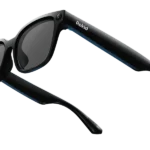
Ray-Ban Meta vs XREAL Air 2 Pro, Which Future Should You Wear?
The “Lifestyle” Choice: Ray-Ban Meta
I expected the Ray-Ban Metas to be another “computer-on-my-face” experience, but I was wrong. Unboxing them felt less like opening a gadget and more like picking up a pair of classic shades. They’ve managed to hide the tech so well that you’re left with the same look my dad rocked for years. No wires, no bulk, and—best of all—no distracting screen. For the first time, “smart” tech isn’t getting in the way of a real conversation.
The “Invisible” Tech Experience
I took these on a coastal hiking trip last month. Usually, I’m that person fumbling with my phone to record a waterfall, squinting at a screen and missing the actual majesty of the moment. With the Metas, I just tapped the temple. The 12MP camera captures exactly what I’m seeing in a vertical format that’s perfect for Instagram or just sending to the family group chat.
But it’s the audio that actually changed my daily routine. The open-ear speakers are surprisingly “full.” I can listen to a podcast while walking the dog and still hear a car approaching or a neighbor saying hello. It feels like having a personal soundtrack that only you can hear, without the “plugged-in” isolation of AirPods. It makes the world feel like a movie, and you’re the protagonist.
Android vs. iPhone Nuances
The Meta View app is remarkably polished on both platforms, but there are tiny differences. On my iPhone 15, the integration with Apple Music and Messages is seamless; I can ask Meta to read my texts while I’m driving, and it feels like a natural conversation. On the Android side (tested on a Pixel 8), the “Hey Meta” AI features actually felt a bit snappier. Speaking of AI, being able to look at a menu in a foreign language and ask, “Hey Meta, what is this in English?” is the closest I’ve felt to having a literal superpower. It’s an assistant that sees what you see.
The “Entertainment” Choice: Xreal Air 2 Pro
If the Ray-Bans are about capturing your world, the Xreal Air 2 Pros are about replacing it. These aren’t glasses you wear to a coffee shop to chat with friends—you’d look like you’re from the year 2045, and not in a subtle way. These are the glasses you wear on a six-hour flight when the person next to you is eating something smelly and you just want to disappear.
A Cinema in Your Pocket
The first time I plugged these into my Steam Deck, I actually gasped. It projects a massive, crisp 130-inch virtual screen right in front of your eyes using Micro-OLED technology from Sony. The “Pro” model features Electrochromic Dimming, which is a fancy way of saying you can turn the lenses pitch black with a button press.
I recently used them during a long train commute. While everyone else was craning their necks over tiny 6-inch phone screens, I was leaning back, looking at a theater-sized screen watching Dune. The 120Hz refresh rate makes gaming feel buttery smooth—no lag, just pure immersion. It’s the ultimate “me time” gadget.
The Setup Struggle (Android vs. iPhone)
This is where the Xreal gets a bit “techy.”
- iPhone 15/16 Users: It’s finally “plug and play” thanks to the USB-C port. You plug them in, and your phone screen is mirrored instantly.
- Android Users: If you have a phone that supports “DisplayPort Alt Mode” (like Samsung S-Series), you get the gold-standard experience. Using Samsung DeX with the Xreals is a game-changer; it turns your glasses into a multi-window desktop workstation. I’ve actually written emails in a hotel room using this setup, and it felt like I had a three-monitor office in my backpack.
- The Catch: For older iPhones or non-compatible Androids, you’ll need the Xreal Beam accessory. It’s another thing to charge, but it allows for “Spatial Display,” where the screen stays pinned in one spot even if you move your head, preventing that “motion sickness” feeling some people get.
Deep Dive: Productivity and Professional Use
Ray-Ban Meta vs Xreal Air 2 Pro – Beyond just movies and photos, I wanted to see if these could actually help me work.
With the Ray-Ban Metas, the productivity is all about “multitasking.” I can take a 20-minute Zoom call while I’m folding laundry or pacing my office. The microphones are “whisper-quiet” in terms of background noise cancellation; my boss couldn’t even tell I was outside in a windy park. It frees your hands in a way that feels liberating.
With the Xreal Air 2 Pro, productivity is about “focus.” If you work in an open-plan office or a noisy cafe, you can put these on, pull up a giant virtual spreadsheet or code editor, and literally block out the distractions. It’s a private workspace that no one can shoulder-surf. However, typing while wearing them takes practice since you can’t always see your physical keyboard clearly depending on the dimming settings.
The Comfort Factor: Can You Wear Them All Day?
This is the “make or break” for smart glasses – Ray-Ban Meta vs Xreal Air 2 Pro.
The Ray-Bans weigh about 50 grams. For context, a standard pair of Wayfarers is around 40 grams. You really don’t feel the difference. I’ve worn them for 8 hours straight (using them as my primary sunglasses) without a headache. The charging case is also a masterpiece—it’s leather-bound and looks like a standard Ray-Ban case, but it holds enough juice to recharge the glasses 8 times.
The Xreals are light for what they are (75 grams), but you definitely feel them. Because they are tethered, you have a thin USB-C cable running from the temple to your pocket. It’s a bit of a “tail.” After two hours of watching a movie, I usually feel a bit of pressure on the bridge of my nose. They are incredibly comfortable for sessions, but they aren’t “all-day” wear.
The Daily Grind – Ray-Ban Meta vs Xreal Air 2 Pro
| Feature | Ray-Ban Meta | Xreal Air 2 Pro |
| Primary Use | Social, Capture, Calls, AI | Movies, Gaming, Productivity |
| Display | None (Clear/Sun lenses) | 1080p Micro-OLED (Virtual 130″) |
| Camera | 12MP (Photo & 3K Video) | None |
| Connectivity | Completely Wireless | Tethered (USB-C Cable) |
| Battery Life | ~4 hours (32+ with case) | Powered by your phone/device |
| Weight | ~50g (Very Light) | ~75g (Light for AR) |
Which one should you buy?
Buy the Ray-Ban Meta if: You want a stylish pair of glasses that replaces your headphones and your camera. If you love capturing “POV” moments of your kids, your travels, or your cooking without holding a phone, these are unbeatable. They are the best smart glasses for everyday wear. They are for the person who wants to stay connected to the world while enhancing it with AI and music.
Buy the Xreal Air 2 Pro if: You are a gamer, a frequent flyer, or a tech enthusiast who wants a private cinema in your pocket. They are effectively a wearable monitor. If you spend hours on YouTube, Netflix, or your Steam Deck and want the biggest screen possible in the smallest footprint, these are for you. They are for the person who wants to escape into their digital content.
Final Thoughts
Ray-Ban Meta vs Xreal Air 2 Pro, I find myself reaching for the Ray-Bans 90% of the time because they fit into my life so easily. They have become my favorite piece of tech in a decade because they actually get me off my phone. But for that other 10%—the rainy Sunday afternoons, the long flights, or the hotel rooms—the Xreal Air 2 Pro provides an experience no smartphone or tablet can touch.
It’s not a matter of which is better Ray-Ban Meta vs Xreal Air 2 Pro; it’s a matter of where you want your eyes to be: in the moment, or in the movie.
FAQ: Common Questions
Q: Do the Ray-Ban Metas have a screen?
A: No. They are strictly for audio, photography, video capture, and AI assistance. There is no visual overlay or heads-up display.
Q: Can I use prescription lenses with both?
A: Yes! You can order Ray-Ban Metas with prescription lenses directly. For the Xreal Air 2 Pro, they include a prescription frame insert that you can take to an optician like LensCrafters or Ro-Shambo.
Q: Does the Xreal Air 2 Pro work with the Nintendo Switch?
A: Yes, but you usually need the Xreal Beam or a specialized HDMI-to-USB-C adapter to provide power to the glasses while receiving the video signal.
Q: Is the video quality on the Ray-Bans good enough for YouTube?
A: For “Shorts” or “Reels,” absolutely. The 3K resolution and stabilization are impressive. For long-form cinematic content, you’ll still want a dedicated camera or a high-end smartphone.
Q: Do I need a specific phone for the Xreal glasses?
A: Your device must support USB-C DisplayPort Output. Most modern flagships (Samsung S21+, iPhone 15/16, iPad Pro) work natively. Check Xreal’s compatibility list before buying.
Q: Are they waterproof?
A: The Ray-Ban Metas are IPX4 water-resistant (fine for a light drizzle or sweat), while the Xreals have no official IP rating. Keep both away from the pool!
Additional Helpful Links
- Another XREAL Air comparison – XREAL Air 2 Pro vs Viture Pro: The Ultimate Smart Glasses Battle
- Read about the Rokid comparison – Rokid Smart Glasses Comparison vs Ray-Ban Meta
Authoritative Sources & External Links
- Ray-Ban Meta Official Site: https://www.meta.com/smart-glasses/
- XREAL Official Site: https://www.xreal.com/