Smart Glasses Cleaning “How-To” for Longevity
I’ll never forget the first time I took my Ray-Ban Metas out for a spin. I felt like I was living in the future—snapping photos with a tap and listening to podcasts through the frames while walking the dog. But about forty-eight hours in, that “future” started looking really blurry. I’d managed to plant a giant, greasy thumbprint right over the camera lens, and the display was covered in a film of sweat and dust. It’s a weird realization when you first get these things: you aren’t just wearing glasses anymore; you’re wearing a computer on your face, and your old habit of wiping them on your sleeve just isn’t going to cut it anymore. Continue reading to learn the proper method of Smart Glasses Cleaning and AI glasses maintenance.
I did what any normal person does: I breathed on them and used the hem of my cotton T-shirt. Big mistake.
Smart glasses aren’t just “glasses.” They are expensive, wearable computers with delicate sensors, microphones, and camera glass that are much more sensitive than your standard pair of Ray-Bans. Whether you’re rocking the XREAL Air 2s, Ray-Ban Metas, or Viture Pros, you need a Smart Glasses Cleaning strategy that doesn’t fry the electronics or scratch the high-tech coatings.
Here is my personal, battle-tested guide for AI glasses maintenance and keeping your smart glasses pristine without ruining them.
Why Your Shirt is the Enemy to AI Glasses Maintenance
Before we dive into the how, let’s talk about the why. Standard glasses are often made of CR-39 plastic or polycarbonate. Smart glasses, however, often have “waveguide” displays—microscopic layers of glass or plastic that “pipe” light into your eyes. They also have oleophobic (oil-repelling) and anti-reflective coatings that are incredibly thin. Smart glasses cleaning must be done correctly to insure a clear view.
When you use a T-shirt or a paper towel, you are essentially rubbing wood fibers (in paper) or trapped dust particles (in your shirt) into those coatings. It’s like using a piece of 2000-grit sandpaper on a Ferrari. One wipe won’t kill it, but after a month, you’ll notice a “haze” that never goes away.
Power Down First
It sounds obvious, but I once tried to wipe a smudge off my XREALs while they were plugged into my iPhone. I accidentally triggered about six different apps, “long-pressed” a setting I didn’t mean to, and the heat from the processors made the cleaning solution evaporate into a sticky streak instantly.
Step 1: Disconnect from your Android or iPhone. Step 2: Power the glasses off completely. This prevents accidental “ghost touches” and ensures you aren’t trapping heat while cleaning.
Smart Glasses Cleaning Guide
The Daily Routine: The “Dry Method”
If you’re just dealing with light dust or a fresh fingerprint, the dry method is your best friend.
- The “Pre-Blow”: Use your breath (or better yet, a can of compressed air) to blow away any loose grit. If you wipe a lens that has a tiny grain of sand on it, you’ve just made a permanent scratch.
- The Microfiber Magic: Only use a high-quality, clean microfiber cloth. I keep one in my pocket and a “master cloth” in the charging case.
- Small Circles: Don’t scrub back and forth. Use gentle, light circular motions starting from the center of the lens and moving outward.
Pro Tip: Wash your microfiber cloth! If the cloth is dirty, you’re just moving yesterday’s face oils back onto today’s lenses. Throw it in the wash with your towels (but skip the fabric softener—it leaves a waxy residue).
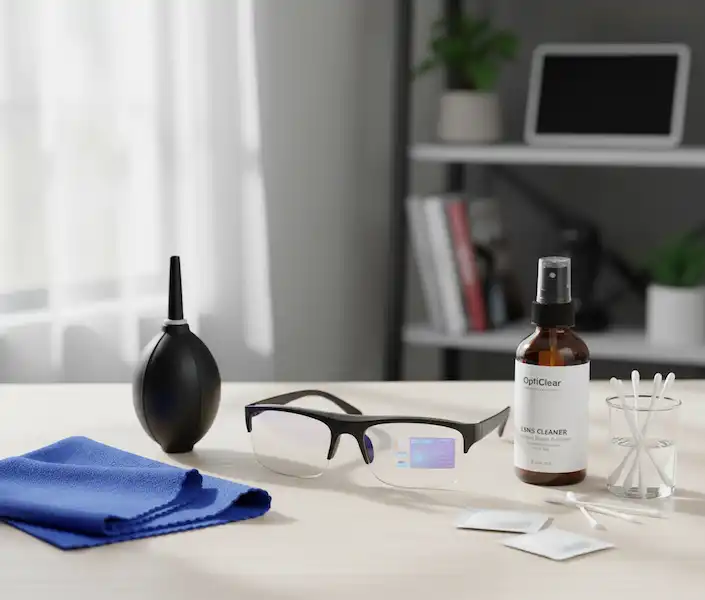
Here’s an example of the ideal microfiber cloth and lens cleaning solution.
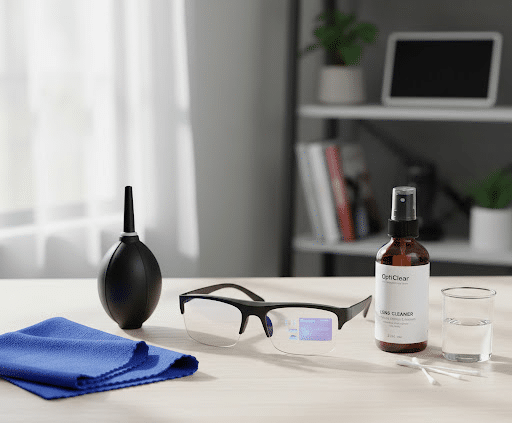
Important Note: Some smart glasses have display elements integrated into the lens itself. Always refer to your device’s user manual for specific cleaning instructions for these sensitive areas.
The Deep Clean: For When “Life Happens”
Last summer, I wore my smart glasses to a BBQ. Between the humidity, the sweat, and an accidental splash of soda, they were a disaster. When a dry cloth isn’t enough, follow this protocol:
1. The Solution
Never use Windex or glass cleaner. The ammonia will eat through your lens coatings faster than you can say “Hey Meta.” Instead, use an alcohol-free lens cleaner. If you’re in a pinch, a single drop of lotion-free dish soap (like Dawn) mixed with distilled water is the “gold standard” used by opticians.
2. The Application
Never spray the glasses directly. I can’t stress this enough. Smart glasses have tiny holes for microphones and speakers. If liquid gets in there, you’ve got a very expensive paperweight. Spray the cloth, make it “damp” but not “wet,” and then wipe.
3. The Details (The Grime Gutter)
The “nose bridge” and the “hinges” are where the real gross stuff lives—skin cells, sweat, and makeup.
- The Tool: Grab a Q-tip (cotton swab).
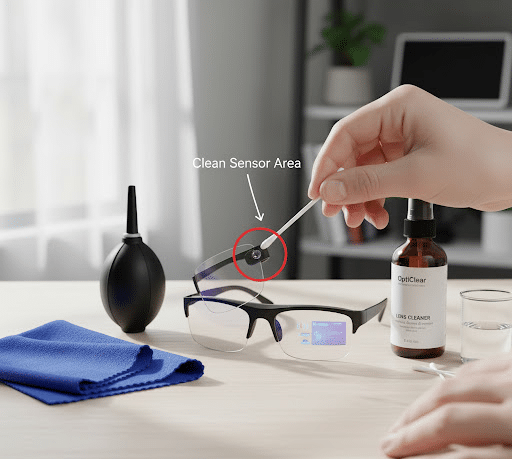
- The Move: Dampen the Q-tip and run it along the inner rim where the lens meets the frame. This is usually where “smart” features like the proximity sensor live. If that sensor is dirty, your glasses might think you’ve taken them off and turn off the display.
Special Care for the Camera & Sensors
On the Ray-Ban Metas, the camera lens is tiny and sits right on the corner. It is a magnet for oils. I’ve found that a dedicated “lens pen” (the kind photographers use) works wonders here. It has a small carbon tip that “soaks up” oil rather than just spreading it around.
For the AR sensors on devices like the Magic Leap or HoloLens, avoid any liquids entirely. A dry, fresh microfiber is the only thing that should touch those sensors to ensure the “tracking” doesn’t get wonky.
Here’s a visual guide for locating and cleaning sensors.
Integration with iPhone & Android
When you finish Smart Glasses Cleaning, reconnect your glasses to your phone.
- iPhone Users: Check your “Find My” or the proprietary app (like Meta View) to ensure the sensors are registering properly.
- Android Users: If you use AR space apps (like Nebula for XREAL), do a quick “calibration” check. If the image looks tilted or “jittery” after cleaning, you might have left a smudge on one of the outer tracking cameras.
Additional Helpful Content
Best Practices for Maintaining and Cleaning Your Smart Glasses
- Always use the provided case: When not in use, store your smart glasses in their protective case to prevent dust accumulation and accidental damage.
- Handle by the frame: Avoid touching the lenses or inner display areas with your fingers.
- Keep away from extreme temperatures: High heat or extreme cold can damage the electronics and battery.
- Avoid water exposure: Unless your smart glasses are specifically rated for water resistance, keep them away from liquids.
- Regularly check for firmware updates: Software updates often include optimizations that can improve performance and potentially even impact how sensors function.
Cleaning Frequency Chart to Keep Your Smart Glasses Clean
| Component | Recommended Frequency | Notes |
| Lenses | Daily / As Needed | Essential for visual clarity. |
| External Sensors | Weekly | Crucial for feature performance (gesture, eye tracking, etc.). |
| Cameras | Weekly | For clear photos/videos. |
| Charging Contacts | Monthly / As Needed | Prevents charging issues. |
| Frame & Temples | Bi-weekly | For general hygiene and appearance. |
FAQ: Everything You’re Afraid to Ask
Q: Can I use 70% Isopropyl Alcohol wipes? A: It depends. For the frames, usually yes. For the lenses, be very careful. Many manufacturers, including Apple for the Vision Pro, suggest avoiding harsh alcohols on certain optical surfaces. Stick to “Lens Safe” wipes like those from Zeiss, which are specifically formulated not to strip coatings.
Q: My glasses are “water-resistant.” Can I just rinse them under the tap? A: I wouldn’t. “Water-resistant” (IPX4) usually means they can handle light rain, not a high-pressure stream from a faucet. Also, tap water contains minerals (calcium, magnesium) that leave “hard water spots” when they dry. If you must use water, use distilled water.
Q: There is “gunk” in the speaker grille. How do I get it out? A: Use a soft-bristled toothbrush (dry!) or a piece of cleaning putty. Gently press it against the grille and pull away. Never poke a needle or toothpick into the speaker holes; you’ll puncture the acoustic membrane.
Q: How often should I clean them? A: A quick dry-wipe every time you put them in the case. A “wet” deep clean once a week. If you wear makeup or sunscreen, you’ll likely need to clean the nose pads and inner frames daily to prevent breakouts on your skin.
My “Travel Kit” Essentials
I never leave the house without a small hardshell case. If you’re serious about your tech, here is what should be in your bag:
- Two Microfiber Cloths: One for lenses, one for the oily frames.
- Travel-sized Lens Spray: (Alcohol-free).
- A Hard Case: Never, ever “toss” smart glasses into a backpack pocket. The pressure can misalign the internal displays.
- A Small Blower: To get dust out of the corners.
Final Thoughts
Smart glasses are the first step into a larger world of “spatial computing.” They are an investment in your productivity and your memories. Treating them like a $10 pair of gas station sunglasses is the quickest way to end up with a blurry, frustrating experience.
Keep them clean, keep them dry, and for the love of all things tech—put the T-shirt down.
Additional Helpful Links
- Learn about smart glasses technology limitations – Smart Glasses Technological Limitations: Display, Camera, Processing & Network
External Links for Authoritative Sources
- American Academy of Ophthalmology – How to Clean Your Eyeglasses: https://www.aao.org/eye-health/glasses-contacts/how-to-clean-glasses (Provides general best practices for lens care)
- National Institutes of Health – Lens Coatings Research: https://www.nih.gov/ (Search for research papers on optical coatings and their durability)