Mastering Smart Glasses Voice Commands
I’ll be honest: the first time I walked into a grocery store wearing smart glasses, I felt like a total dork talking to my frames. There I was, staring at a wall of olive oil, whisper-shouting “Hey Meta, take a photo” because I couldn’t remember which brand my wife liked. It’s a strange hurdle to get over, but fast forward a few months, and I can’t imagine going back to a life without them. Using AI glasses voice commands isn’t just about looking like a secret agent; it’s about finally getting your hands back from the “smartphone grip” we’ve all been stuck in for the last decade.
If you’re just getting started or trying to figure out why your glasses aren’t listening to you, I’ve put together this guide based on my own trial-and-error (mostly error) with Android and iPhone setups. Learn more about using AI glasses voice commands.
The Reality of AI Glasses Voice Commands
Before we dive into the “how-to,” let’s talk about expectations. In my experience, these things aren’t 100% perfect. If you’re standing next to a jackhammer or in a crowded subway, Siri or Google Assistant is going to have a hard time. But when it works—like when you’re biking and you need to reply to a text without crashing—it feels like magic.
The technology basically acts as a bridge. Your glasses have tiny microphones that catch your voice, send that data via Bluetooth to your phone, and then the phone does the heavy lifting. This is why having a solid connection is everything. If your phone is buried at the bottom of a lead-lined backpack, you’re going to have a bad time. I usually keep mine in a front pocket or a side pouch on my bag to keep the line-of-sight clear.
The Hardware: Why Microphones Matter
One thing I didn’t realize until I started tearing through different brands is that not all “smart” frames are built the same. My Ray-Ban Metas have a five-mic array. That sounds like overkill, right? But it’s there to cancel out wind noise. If you’ve ever tried to take a call while walking on a breezy pier, you know how hard it is for the person on the other end to hear anything but whoosh.
Cheaper frames often use a single or dual mic setup. In a quiet room, they’re fine. But the second you step outside, they struggle to pick up your “Wake Word.” I learned this the hard way with a pair of budget frames I bought on a whim—I practically had to scream to get them to skip a song while I was jogging.
Setting Up for Success: Android vs. iPhone
Depending on which camp you’re in, your experience will vary a bit. I’ve used both, and here’s the breakdown for the best success with Smart Glasses Voice Commands.
The Android Experience (Google Assistant)
Android users generally have it a bit easier because Google Assistant is deeply integrated into most smart glasses ecosystems. Whether you’re using Ray-Ban Meta, Xreal, or Amazon Echo Frames, the setup usually involves:
- The App: Download the companion app (like Meta View or Alexa).
- Permissions: This is where people usually mess up. You have to grant the app “Always On” access to your microphone and location. If you don’t, the first time you try a command with your phone in your pocket, nothing will happen.
- The Wake Word: For most, it’s “Hey Google.” I’ve found that Android handles “background listening” much better, meaning I rarely have to touch my glasses to get them to wake up.
I’ve also noticed that on Android, you can get much more granular with your notifications. I set my glasses to only read me texts from my wife and my boss. Everything else stays as a silent vibrate on my wrist or phone. This prevents your glasses from constantly talking over your favorite podcast.
The iPhone Experience (Siri)
Apple is a bit more protective of its “walled garden.” If you’re using Ray-Ban Meta glasses, you’ll be using “Hey Meta” for internal stuff (like taking photos), but for sending an actual iMessage or checking your Apple Calendar, you’ll need Siri.
- The Tweak: On my iPhone, I noticed that Siri sometimes wouldn’t trigger if the phone was locked. You have to go into Settings > Siri & Search and make sure “Allow Siri When Locked” and “Listen for ‘Hey Siri'” are toggled on.
- The Shortcut: On many frames, like the Echo Frames, you can actually set a physical button press to trigger Siri directly, which I prefer because it’s more discrete than saying “Hey Siri” in a quiet coffee shop.
One weird iPhone quirk: if you have an Apple Watch on, sometimes the Watch tries to answer the “Hey Siri” command instead of the glasses. I usually have to turn off “Listen for Hey Siri” on my Watch to make the glasses the primary listener.
A Day in the Life: When I Actually Use Voice
To give you an idea of why this tech is useful, let me walk you through my typical Tuesday of using Smart Glasses Voice Commands.
08:00 AM – The Morning Commute
I’m walking to the train with a coffee in one hand and my bag in the other. A text comes in. I don’t put anything down. I just wait for the chime and hear, “Message from Sarah: Did you remember the dry cleaning?” I simply say, “Reply: I’ll grab it on the way home.” Boom. Done. No spills, no stopping.
12:30 PM – The Lunch Walk
I like to listen to audiobooks. If I need to pause to talk to a neighbor, I don’t dig for my phone. A quick tap or a “Hey Meta, pause” does the trick. I also use this time to set reminders. “Hey Google, remind me to call the dentist at 4 PM.” These reminders sync perfectly with my phone’s calendar, so I never miss a beat.
03:00 PM – The “Deep Work” Phase
Sometimes I forget my phone in the kitchen while I’m working in my office. If someone calls, my glasses ring. I can answer right there. The audio quality is surprisingly good—most people can’t even tell I’m talking through my glasses.
06:30 PM – Cooking Dinner
This is the “killer app” for me. My hands are covered in flour or chicken juice. I need to know how many grams are in an ounce. “Hey Meta, how many grams in an ounce?” or “Set a timer for 12 minutes.” It sounds small, but not having to wash my hands just to check a phone screen is a massive quality-of-life upgrade.
Mastering the Commands: What Actually Works?
I’ve found that while these glasses can do a lot, there are a few “bread and butter” commands I use daily when I need Smart Glasses Voice Commands.
Communication (The “Hands-Free” Life)
- “Call Mom.” (Classic, works 99% of the time).
- “Read my last message.” This is a lifesaver when you’re driving or carrying groceries.
- “Send a WhatsApp to Dave saying I’m five minutes away.” #### 2. Media ControlIf you’re a podcast junkie like me, you’ll love this.
- “Skip.”
- “Volume up.”
- “What song is this?” #### 3. The “AI” Stuff (Specifically Ray-Ban Meta)The newer “Look and Ask” features are wild. I was at a museum recently and said, “Hey Meta, look and tell me what this painting is.” It took a second, processed the image, and whispered the history of the piece into my ear. It felt like having a private tutor.
I’ve also used this feature while hiking. I saw a weird mushroom and asked, “Hey Meta, look at this and tell me if it’s poisonous.” (Side note: Don’t eat the mushroom based only on what your glasses say, but it’s a cool starting point for research!)
When Things Go Wrong (And They Will)
I’ve spent way too much time shouting at my glasses while people stared. If your voice commands aren’t working for Smart Glasses Voice Commands, check these three things:
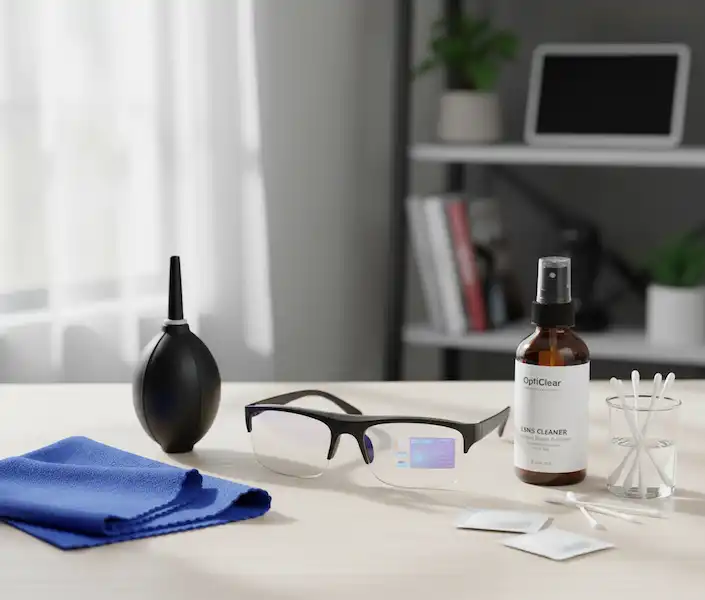
- The “Dust” Factor: These microphones are tiny. I once thought my glasses were broken, but it turned out a tiny bit of lint from my case was stuck in the mic hole. A quick puff of air fixed it.
- Bluetooth Congestion: If you’re in a place with a million other Bluetooth devices (like a tech conference or a busy gym), the connection can stutter. Sometimes just turning Bluetooth off and on again on your phone resets the “handshake.”
- The App Sleep: Android and iOS are aggressive about saving battery. They will “kill” the companion app if you haven’t opened it in a while. If your glasses aren’t responding, open the app on your phone to “wake it up.” On Android, I recommend going into the app settings and turning off “Battery Optimization” for your glasses app.
The Privacy Conversation
One thing I constantly get asked is, “Is it always listening?” It’s a valid concern. We’ve all seen the sci-fi movies where the tech turns on us.
Most reputable glasses have a physical LED that turns on when the mic or camera is active. It’s a good idea to familiarize yourself with these lights. For example, on the Ray-Ban Meta glasses, there’s a very bright white LED. If you try to cover it with tape, the camera won’t even record.
From a data perspective, your AI glasses voice commands are usually processed by the same engines that power your phone. If you trust Google Assistant on your phone, you can generally trust it on your glasses. If you’re worried, most apps (like Meta View or Alexa) allow you to go in and delete your voice recording history. I do a “digital spring cleaning” every few months and wipe mine.
Comparison: Popular Frames and Their “Voice Personalities”
| Feature | Ray-Ban Meta | Amazon Echo Frames | Xreal Air 2 |
| Primary Assistant | Meta AI / Siri / Google | Alexa | Google / Siri (via phone) |
| Best For | Photos & Social Media | Productivity & Shopping | Watching Movies & Gaming |
| Wake Word Reliability | Very High | High | Moderate (requires app) |
| Speaker Quality | Excellent (Leaky) | Good (Focused) | Immersive |
The “Social Etiquette”
We’re still in the “socially awkward” phase of wearable tech. I’ve developed a few “rules” for myself to avoid being that person when using Smart Glasses Voice Commands:
- The Whisper: You don’t need to shout. The mics are literally an inch from your mouth. A stage whisper is usually enough.
- The Context: I don’t use voice commands in elevators or public bathrooms. It’s just weird.
- The Visual Cue: If I’m using my glasses to take a photo or record a video via voice, I make sure the person I’m with knows. A quick “Hey, I’m going to take a video of this view” goes a long way in making people feel comfortable.
Pro-Tips from a Long-Term User of Voice Commands
- The “Half-Second” Rule: Don’t start talking immediately after saying the wake word. Give it a tiny beat to “wake up.” You’ll usually hear a soft chime in the frame’s speakers. If you talk too fast, the assistant misses the first word of your command.
- Keep the Phone Close: Bluetooth has a range, but the closer your phone is to your head (like in a chest pocket or a bag), the less “lag” you’ll experience in the voice processing.
- Language Learning: I’ve been trying to learn Spanish, and I often ask my glasses, “How do you say ‘where is the bathroom’ in Spanish?” while I’m out. It’s a great way to practice on the fly without looking like a tourist staring at a translation app.
- Clean Those Mics: Every week or so, take a soft, dry toothbrush and gently brush the microphone holes. You’d be surprised how much skin oil and dust gets in there and muffles your voice.
Looking Ahead: The Future of Talking to Our Gear Using Voice Commands
We are just scratching the surface. With the integration of LLMs (Large Language Models), these voice assistants are getting smarter. Instead of just “Set a timer,” we’re moving toward “Hey, remember that I liked that red wine we had last night.” The glasses will remember the context of your day. It’s a bit “Her” (the movie), but in a way that actually makes life simpler.
I’ve already started seeing this with the Meta AI updates. The conversations are becoming less like talking to a robot and more like talking to a very helpful, very fast assistant who happens to live on your face.
Thoughts
Smart glasses are still in their “awkward teenage years,” but the Smart Glasses Voice Commands aspect is the most polished part of the experience. Whether you’re an Android devotee or an Apple enthusiast, the key is to be patient during the first week of setup. Once you get those permissions dialed in and find the right “voice” for your commands, you’ll find yourself leaving your phone in your pocket more and more.
It’s about freedom. Freedom from the screen, freedom from the “neck slouch,” and the ability to stay present in the world while still staying connected. Just don’t be surprised if you find yourself talking to your regular sunglasses by mistake after a week—I’ve done it, and that is when you truly feel like a dork.
If you’re looking for more technical troubleshooting, I always recommend checking out the official Android Help or Apple Support pages, as they update their voice protocols pretty frequently.
FAQ: Everything I Wish I Knew Sooner
Q: Do I need an internet connection for Smart Glasses Voice Commands?
A: Mostly, yes. Simple things like “Volume Up” might work offline on some models, but anything involving “Call [Name]” or “What’s the weather?” needs your phone to have data. If you’re out in the woods without service, your smart glasses basically become regular glasses with speakers.
Q: Can I use Smart Glasses Voice Commands with Spotify?
A: Absolutely. This is probably my #1 use case. I use “Hey Meta, play my ‘Discovery Weekly’ on Spotify” every Monday morning while walking the dog. You just have to link your account in the companion app first. You can also skip tracks or ask “Who is this artist?” without touching a thing.
Q: Will it work if I have an accent?
A: I’ve found that modern assistants (Google especially) are getting much better at this. However, you can usually “train” the assistant to your voice in the phone settings to improve accuracy. Google’s Voice Match is great for this. It takes about two minutes and makes a world of difference.
Q: What about battery life?
A: Using “Always On” voice activation (where the mic is waiting for the wake word) drains the battery faster. If I’m on a long hike and know I won’t need the assistant much, I’ll turn off the wake word in the app and just use the physical button on the frame to trigger the assistant when I actually need it. This can save about 20% of your battery life over a day.
Q: Is it awkward to use Smart Glasses Voice Commands in public?
A: Honestly? Yes, at first. But with earbuds being so common now, most people just assume you’re on a hands-free call. I’ve noticed that as long as I’m moving (walking, biking), nobody cares. It’s only when you’re standing perfectly still in a quiet room that it feels a bit “Main Character Syndrome.”
Q: Can I use Smart Glasses Voice Commands to send an email?
A: You can, but it’s a bit of a headache. Dictating a long email usually results in some typos. I stick to short texts or Slack messages. If it’s longer than two sentences, I’ll wait until I’m at my computer.
Q: Do the glasses work with Microsoft Teams or Zoom?
A: Most smart glasses act as a Bluetooth headset. While you can’t necessarily say “Hey Meta, join my Zoom call,” you can join the call on your phone and use the glasses’ mics and speakers to talk. It’s a great way to stay mobile during long meetings.
Additional helpful information:
- Some details about upgrading the software in your smart glasses – How to Update Smart Glasses Software?
- Be sure you have the correct companion app installed on your smartphone – Smart Glasses Companion Apps for your Phone
- Watching videos on smart glasses may be useful – How to Watch Videos on Smart Glasses?
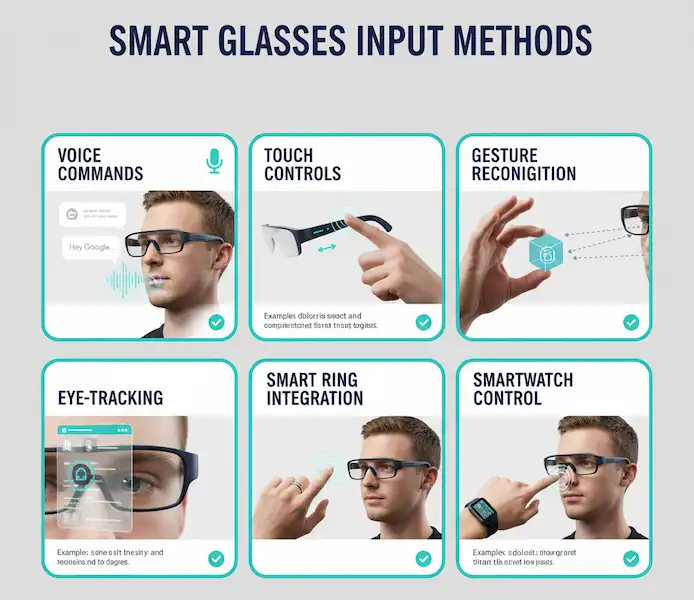
- More about smart glasses input methods – Smart Glasses Input: Voice, Touch, Gestures & More